Monday, September 26, 2011

Which Mobile OS?

When you look at the dozens of phones available to you, what do you look for; the physical device, with it's mirror-like screen and brushed aluminium finish, or do you consider what makes each phone perform the myriad tasks you intend performing? If you haven't thought in these terms, you should. You're about to lay down a sizable chunk of your hard earned cash, or tie yourself into an expensive 24 month contract, and you should really know what you're buying.

To me, it's all about the software. These days, the main manufacturers are all capable of making exceptional devices that vary little from each other in terms of hardware. However, the software is constantly evolving and improving, and if you pick the right phone, you'll continue to get updates and upgrades that will improve your experience, and even after 2 years, you won't feel like you're stuck with old technology.

As can be seen from the graph of worldwide 2011 Q2 smartphone sales to end users by operating system, according to Gartner, Android has clearly captured the lion's share of the market, up 13,3% since 2010, with its multiple manufacturer support from Samsung, HTC, Motorolla, LG and Sony Ericsson. However, Google's purchase of Motorolla could spell trouble for Android if the other manufacturers feel like they're not getting equal treatment and start looking to other OS's for their premium models. Android has another problem, and that is despite regular update to the core OS, these often aren't rolled out to every device, and it's left to the manufacturers, and then the carriers to decide which phones should get upgraded. Google are trying to address this problem, and it may improve with their newer phones.


Symbian may be in 2nd place, but don't be fooled. Symbian is in freefall, losing more than 10% in the last year, and down from complete market domination just 4 years ago, when they held 63,5%.


Apple's iOS takes 3rd place, and considering they essentially only have a single, premium handset (plus a discounted previous generation model) available, that's pretty good. iOS is actually still gaining market share, and I expect continued growth as the next generation is made available to more carriers in the key US market. The launch of iOS5 and the next generation iPhone will also see renewed demand for the iconic device. Where Apple really scores is that they release software updates directly to the customer, so everyone gets to run the latest version all the time, and Apple continue to make their software backwards compatible for several generations.


RIM hold on to 4th place with their Blackberry range, but they're down nearly 4% since a high of nearly 20% in 2009, and despite popularity with text hungry teens, management problems continue to plague the company that was once considered the trendsetter. Their OS is dated; the newly released Blackberry 7 is too little, too late. Blackberry QNX might save them, but launch timing has been pushed out numerous times, so don't hold your breath. 


The dark horse is Microsoft's Windows Phone 7. While it hasn't captured much share yet, Nokia will launch a range of phones before the end of 2011, which may turn things around for the software giant. They've also recently launched a preview of Windows 8, which will use a common format, borrowed from Phone 7, across all devices, from desktops to tablets and mobile phones. This is huge - who wouldn't want a phone that looks and acts just like all their other devices, and sync up seamlessly via the cloud? The jury is still out on whether the UI is suitable for non-touch screens, but regardless, the tie-up with Nokia will be sufficient to see some substantial growth over the next 2 years.


So where does this leave us? There is room for 3, maybe 4 OS's in the market. Why not more? Key to the success of any modern OS is the availability of apps to run on these devices, and developers will not support an infinite number of systems. Android and Apple currently rule the roost, so it'll be between Phone 7 and Blackberry OS to take 3rd. My money would be on Phone 7, because Microsoft have too much money to let it fail. That will leave Blackberry to battle on in 4th place, with a shrinking market share.


So when you're confronted with all those shiny new phones that promise so much, think about where those brands will be in a years time, because you don't want to be stuck with a device that is no longer supported.


Thanks for reading.


Sunday, September 25, 2011

Mobile Messenger Services Are A Mess

The IM sector is red hot again these days, as people turn to these services to replace the ridiculously overpriced SMS services offered by the carriers. RIM have managed to do this very successfully with their BBM messaging service, despite the fact that BBM is limited to Blackberry devices. For many, this is the number one reason to purchase a Blackberry. In the teen market this is currently the phone of choice.

Seeing the success that RIM has had with this strategy, Google and Apple have rushed to bring similar products to market.

Google's strategy is a bit confusing. Google Chat (or is it Google Talk?) has been developed into a great IM package that works across desktop and mobile, and includes video, SMS, group chat and more. Then along comes the Google+ mobile app and now we have Huddle, a very simple group chat app, built into the G+ app. Now I'm not technical, but why didn't Google just incorporate their existing IM package? Huddle has now been updated to include photo sharing, and simultaneously changed its name to Messenger. The problem with this service is that it's mobile only. For me, turning away from my desktop, with it's large ergonomic keyboard, to reply to a message on my phone, with it's tiny keyboard, is very frustrating. It makes no sense at all!

In early October (hopefully) Apple will release iOS5 into the wild, and one of the new features is iMesenger. I believe it will work across mobile and desktop, but will unfortunately be limited to Apple devices, which makes it pretty useless. I understand that the strategy is to turn each iPhone user into a salesperson: "Get an iPhone like mine and we can chat for free!" It hasn't worked with Facetime, and it won't work here. Really Apple, am I only allowed to be friends with people that also use Apple products? C'mon!

I'm not a Facebook fan, but at least they got this right. Well almost. Facebook Messenger works in the browser and in their mobile app, and now Facebook have launched a separate Messenger app for smartphones, which is a great idea, as you don't have to open the main app first. Are you listening Google? The problem: you can only chat with people you have friended on Facebook. I don't want all my work colleagues following my social activities on Facebook, but it would be useful if I could text them!

A number of startups have also attempted to gain some traction in this sector. Beluga was gaining in popularity, but Facebook bought them out, and created their Messenger service. Whatsapp has a big following, and it's not OS specific, but there is no desktop version available, so it's mobile only.

So what's the answer? Currently, I use Google Talk/Chat, Google+ Messenger, Facebook Messenger, Whatsapp, and when iOS5 comes out I'll also use iMessenger. With my Blackberry carrying friends I feel a bit left out, and have to hope they use Whatsapp. Of course, in an emergency, good old SMS is still available, but I would love to be able to move away from SMS entirely. Until one of these companies can build all this functionality into one app, I'm forced to keep using a combination, depending on whom I'm chatting with. What a mess!

And who owns the rights to the Messenger name anyway?

Thanks for reading.
Sunday, January 30, 2011

iOS or Android?

This is one of the most hotly debated topics in the tech world over the course of the last year. Should one prescribe to Steve Jobs's 'walled garden', or go with Google's 'open' approach? Sadly, I don't have the finances to afford both - I have one contract phone and I'll be stuck with whatever I choose for the next 2 years.
Many people mock my indecision, but the latest generation of smartphones are far more than phones; for many that has become a secondary function. A smartphone in 2011 is also a pocket computer and web browser, a media player, a still and video camera, a calendar, an address book, a calculator, and an alarm clock. Furthermore, thanks to the hundreds of thousands of apps available, it can also be a GPS navigation device, an ebook reader, a photo editor, an rss reader, or a portable game machine. It can be the biggest time suck, or a lifesaver in a difficult situation. For Apple, the iPhone has turned them into one of the most valuable companies in the world; no wonder Eric Schmidt has repeatedly stated that Google's focus for 2011 is on mobile.
So what are the choices:
Symbian - still the most widely used mobile OS, thanks to its use in many Nokia feature phones, Symbian has been floundering, and their future in smartphones is uncertain.
WebOS - developed by Palm and bought out by HP, this is a fantastic OS but has limited prospects until HP's future plans are clarified.
Blackberry OS - another proprietary OS, RIM have captured a huge portion of the market, but even with the introduction of their touchscreen models, BB's remain mostly business phones.
Android - Google's open source OS has seen enormous growth in 2010 thanks to widespread adoption by the likes of HTC, Samsung, Motorola, Sony Ericsson and LG.
iOS - Apples iconic OS was at the heart of the touchscreen revolution and is exclusive to their products, including the iPhone, iPad and iPod Touch.
Considering the options, it looks like a simple choice between iOS or Android, but it's anything but simple. The two companies, Apple and Google, have completely different strategies, and depending on your requirements and/or expectations, these strategies will undoubtedly influence your choice. At first look, the choice for me seemed obvious. I'm a big fan of Google's products, and have long respected their efforts at openness. I've followed their development of Android with eager anticipation, and looked forward to experiencing entering my Google user name and seeing all my contacts, email and calendar events syncing before my eyes! Based on this perception I convinced my girlfriend to opt for a Sony Ericsson X10 Mini running Android when her contract came up for renewal. 
The problems started almost immediately. The phone was shipping with Android 1.6, when the talk in the tech world was all about the imminent release of 2.3. A couple of weeks later an upgrade was rolled out: version 2.1! And what's more, Sony Ericsson announced that this would be the last update for the X10 series. So, within less than 2 months of purchase, we learned that we would not receive any of the future Android goodness. The reason for this is clear; with the best intentions in the world, Google continue to push out update after update, but unless you have one of the Nexus range of Google phones, you're reliant on the phone manufacturer to take the latest version of Android and update their proprietary layer of software before they ship it. Then, in many cases, you have to wait for your carrier to add their bloatware as well! By the time you receive the update Google have pushed out 2 later versions! In contrast, Apple sends out their updates via iTunes, directly to the user, and depending on which version of the iPhone you have, you'll get all the new features that'll work with your hardware. Simple, direct and easy to understand.
My next headache came when I was asked to add some music and podcasts. I have not used an iPhone before, but I'm familiar with the process on iPods; plug into my PC running iTunes, choose which playlists to sync, and that's it. I had downloaded DoubleTwist in preparation, so I was all set to go. To be fair, DoubleTwist works quite well with music files. All my iTunes playlists appeared, and synced up quite easily. Podcasts were a different story. DoubleTwist have their own 'subscriptions', but the podcasts I wanted to sync already appeared on iTunes. Creating a 'Podcast' playlist worked, but the files then appeared as music files on the device, so if you stopped playback midway through, on restart the music player started at the beginning again! There are a number of workarounds, but this shouldn't be necessary. Why haven't Google developed an iTunes equivalent yet? The majority of people don't want to mess around with a bunch of different programs to get their media onto their phones; they want something logical and simple. Apple offers this, Google doesn't.
One of the advantages of Android over Google is the Android homescreen. While Apple only offer a collection of icons, or folders of icons, with minimal 'live' interaction by way of the 'badges' showing missed calls, unread messages, etc, Android has live widgets showing weather updates, stock market updates, etc. Androids also have a stunning feature called live wallpaper, introduced from 2.1. These features add some great bling to the Android experience, but almost no-one can keep them activated - they kill battery life!
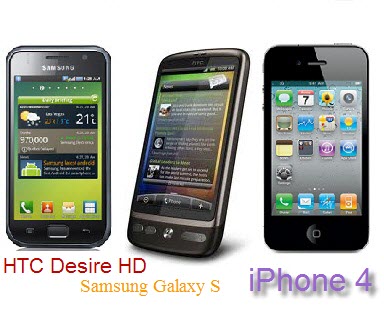
And herein lies the rub. Apple controls the complete iPhone experience; they develop the hardware and the software together, and they have strict control over any apps that are loaded by the user. In contrast, Google have developed a great OS, but other than some guidelines, the phone manufacturers are left to develop the hardware in isolation. App developers are free to create almost anything they like, and the customer has no recall if the app doesn't perform as expected. Google have been concentrating on the OS, and while there are plenty of rumours about wireless syncing, and a cloud based gTunes (my name), there is nothing official right now. The future for Android certainly looks bright, and there's a lot of work going into Android 3.0 for tablets right now. But that's all in the future - I need to decide which phone I'm going to get right now. I can get an iPhone 4 and I know that iOS 4.3, when released, will be available immediately for my phone, and that it'll run seamlessly with all the apps I have. For a similar price I can get an HTC Desire running Android 2.2. If I'm lucky, I might get an upgrade to 2.3 at sometime, but there are no guarantees beyond that. If Google introduce gTunes, but it's only available on Android 3.0, I will probably not get access for 2 years, when my contract comes up for renewal again.
In many ways I believe that Android would be a better fit for me, but as it stands right now I don't think that they're quite there yet. In the past I have been critical of iTunes, and as a pure music player/manager I still believe there are better options, but as an overall product management system it is without peer. Google needs to roll out gTunes, or whatever they're going to call it, as a matter of urgency. They need to take back control of their OS; if the manufacturers and carriers want to add a layer onto Android it has to be separate, and not effect the updates that Google should be rolling out themselves. Every Android phone should be running the latest version of the OS that it's hardware can support. Google needs to set maybe 3 device specs: screen size & resolution and processor performance (perhaps), plus a couple more for tablets, so that anyone developing for the platform knows what needs to be supported. This may not be the 'open' utopia that Larry & Sergey envisage, but it's what the consumers want, and sometimes you need to listen.
The bottom line - unless something drastic happens before the end of February it looks like I'll be crossing over to the iPhone camp for the next 24 months.


Thanks for reading.

Wednesday, December 29, 2010

The best bike computer that you can't buy...!

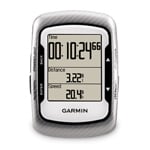
Cycling computers have evolved over the last 10 years. Remember when you had to have a wire running from the sensor on your fork up the the handlebar mounted unit that displayed speed and distance, and that was it. The big breakthrough came with wireless units - I remember my Cateye Cordless 7 being the envy of the day! Then Polar came along and suddenly you could have heart rate, and even altitude on your computer. In my opinion, and in the opinion of no less a blogging authority than the Fat Cyclist, the best bike computer currently available is the Garmin Edge 500, which adds GPS. However, at about R2,400 (or $250 in the States), this is an expensive bit of kit.
Now, if you ask any cyclist to turn out his pockets at the end of a ride, in amongst an assortment of keys, mini-tools and sticky energy bar wrappers, you'll always find a cell phone. And most top-end phones include GPS, so why should we have to pay twice for it? There are numerous apps available for Android, iOS and Symbian phones designed for runners and cyclists, and most of them have a free version. Most rides I go on I track with my phone - I love being able to sit at my computer and see my exact route, speed at each km point, altitude etc.
The problem is, most modern smartphones are a bit big to strap to your handlebars, and their screens are notoriously difficult to read in direct sunlight.
And then I saw the Sony LiveView micro display, and the answer was revealed to me! This is a tiny, Bluetooth connected device that gives a status linked to your phone, letting you control your music or see your Facebook updates. It's so small it can even be worn as a watch! Unfortunately, with only a 1.3" display the LiveView would be a bit small, and with an LED display would almost definitely have the same problems in sunlight as a fully fledged smartphone. The ideal bike computer would have an LCD display similar in size to the Garmin Edge 500 above, but the unit would link via bluetooth to your smartphone which would be doing all the heavy lifting! Even with it's expensive OLED display the LiveView is retailing for only $100, so I figure with a cheaper but slightly larger LCD screen, my device needn't cost any more than that! Any takers?


Thanks for reading.
Wednesday, October 27, 2010

Android vs Symbian

I've been using an Android phone for a few weeks now, and while mostly good, my experience hasn't been without its problems and frustrations. Coming from a Nokia and Symbian experience, it's impossible not to make comparisons.
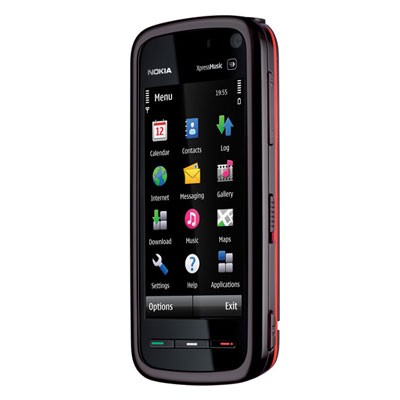
The phone I'm using now is definitely not one of the best examples of Android available, but I expect many of my thoughts are generic. The Sony Ericsson Xperia X10 Mini is very much an entry level smartphone, but its most limiting factor is that it is still running Android 1.6 (Donut). Hopefully that will change before the end of October, when the upgrade to 2.1 (Eclair) is due. Anyway, to put it into context, my previous phone was a Nokia XpressMusic 5800, Nokia's first effort at a touchscreen phone. However, I have also spent some time with an N97 Mini, so I'm fairly familiar with the S60 V5 software, and its capabilities and limitations.
As a Google self-proclaimed fanboy I really want to like Android. However, it's lack of polish came as a big surprise. The OS, certainly in 1.6 form, feels unfinished. Considering the speed at which update are being churned out, maybe this version should be considered unfinished! But worries me is that maybe this is the Android Team's approach, and all versions will be like that.
So what am I talking about? Mainly, it has to do with the features available natively on the phone. For example, Nokia have long offered the option for an ascending alarm ringtone. There's nothing worse than waking to an alarm at full volume! Such a basic feature, you'd think it would be standard on every phone. For sure, if I was developing a new OS, it's just one of the things I would have on my list of essential features. But not Android. Sure, I was able to download a free app (AlarmDroid) that includes that feature, but that's exactly what worries me about the success of Android in the market. Most of the people I know don't want to be bothered with trying to find an alarm app to download; they expect it to come standard, and if it doesn't they'll tell their mates about the lack of features! The Android Team shouldn't be leaving it to the app developers to supply the features for their phones; they should be building those features into the OS.


Of course, the alarm feature isn't the only example. I've had to download an app to monitor data usage (NetCounter), another to add an alarm and pop-up notification for calendar events (Android Agenda Widget), and a third to pull my calendar events into a widget on one of the homepages (Calendar Snooze). These features are standard on Nokia's phones.
Of course, there's a huge amount being written by how important apps are in the post iPhone world. Apple and Google are even adding App Stores to their desktop OS's. And there are some fantastic apps available; many for free. Apart from the obvious Twitter, Facebook and Foursquare ones, I've been very impressed with the likes of Endomondo and CardioTrainer (both for sports tracking via GPS), doubleTwist (music and podcast syncing and playing), and Google's own Google Goggles (search via photos taken on your phone). My point is that many of these, or variations of these, are also available in Nokia's Ovi Market. 
In my opinion, Nokia isn't quite as dead as many tech journalists would have you believe. Apps alone will not make a great OS! 
However, I will pursue with my Android phone for a while longer, and I hope that upcoming upgrades (Gingerbread, Honeycomb) will add the polish that Android needs.

Thanks for reading!

Enhanced by Zemanta

Tuesday, October 26, 2010

Sony Ericsson Xperia X10 Mini

I've long been a Nokia fan, but over the last few years they seem to have lost the plot. Ever since the original iPhone was launched back in 2007, Nokia have steadily lost market share in the smartphone market. Nokia's loss has been Android's gain; in less than 2 years the Google developed mobile operating system has gained substantial footing in this competitive market.

As a self-proclaimed Google fanboy, the attractions for any Android phone are numerous. Above all, the auto sync with gmail, calendars and contacts. After years of wrestling with Mail for Exchange and apps like Emoze, I couldn't wait to get my hands on the real deal!

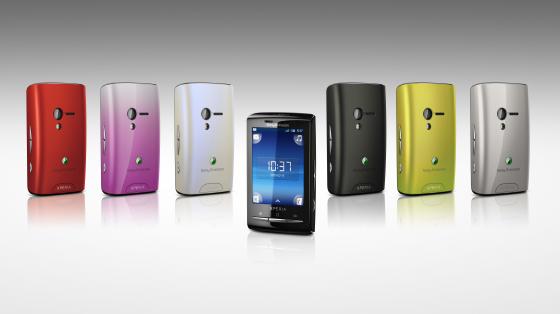
My chance came this week in the form of a Sony Ericsson Xperia X10 Mini. I have this phone on a short term loan from my girlfriend, but I already dread the day I have to go back to my old Nokia 5800. Anyway, back to the phone: this is the smallest Android phone available, and comes in at a very competitive price. It offers the convenience of a touchscreen smartphone, without too much complexity or any of the bulk, weighing in at a featherweight 88g. An ideal handbag phone. The interchangeable coloured backcovers should also appeal to the style conscious. But that's not to say it lacks oomph, I've been very impressed with how smoothly the phone has handled everything I've thrown at it. The 2.55" capacitive screen doesn't offer the highest resolution either; at 240 x 320 pixels don't expect the "retina" display.

The biggest problem with the X10 Mini is shared with its big brother, the X10. Both phones are still running Android 1.6 (Donut), and the update to 2.1 (Eclair) has been pushed back to the end of October. Judging by the reaction on the various forums, everyone is desperate to get their hands on the upgrade. However, its still not clear if or when the Mini will get 2.2 (Froyo). We can only hope...

My other problem has been the battery capacity. At first I couldn't go a whole day without recharging. However, after a weeks use, and several charge/discharge cycles, performance has improved slightly. On the advice of several forums members, I installed the JuiceDefender app. The free version doesn't offer many features, but by reducing the length of time the phone accesses data in the background, the battery life is extended substantially.

Another useful free app is Timeriffic. This allows you to set various 'profiles' for different times of the day. For example, an essential one is to switch off the notification at night. Getting woken up every time I receive an email is not an option!

The X10 Mini has a number of homescreens that can be set up with widgets, one for each page. Flicking through these will give you instant access to your calendar, weather reports, Google Search, etc. Set these up as you like. A vertical flick across the screen reveal the icons for any apps you have loaded. Again, a horizontal flick takes you from page to page, with 9 icons per page. This system works very well, and makes good use of the limited screen space.

The one feature I haven't mentioned is Timescape. This Sony Ecicsson app combines your Twitter and Facebook stream with your text (SMS) messages, MMS and missed calls, into tiles that flow chronologically on the screen. The effect is awesome, but due to concerns about excessive data usage I disabled it almost immediately!

So, as my introduction to Android, what do I think? Did it live up to my expectations? Definitely! Android highlights how dated Symbian has become. I love that almost everything can be modified or adjusted, if not natively, then by using one of the thousands of available apps. As of right now, us South Africans do not have access to the paid apps in the Android Market (although that will apparently change shortly), so it was a nice surprise that almost every app I wanted has been available for free. The Market itself could use some work, especially on discovery, but compared to the Ovi Store it's been fantastic! Looking ahead, I'm thinking about what phones will be available when my current contract comes up for renewal in the new year. One thing I know for sure: it'll be an Android!

Thanks for reading!

Wednesday, May 19, 2010

Nokia N97 Mini

My friends at Nokia SA delivered a package to my office last week. It came as a bit of a surprise, as it's been a while since they've made contact. However, imagine my delight to find an N97 Mini - mine to evaluate for a couple of weeks.

For those not familiar with the Mini, it is the little brother of the 'N' Series flagship model, the N97. As the name would imply, the Mini is smaller is all directions, and is also lighter by 22g. The main differentiating features are the lack of the 'D' Pad, and the 3.2" screen, compared to the 3.5" of its big brother. The mini doesn't have a camera lens protector, but shares the same 5MP camera and dual LED flash. Internally, the key difference is a reduction in the internal memory, from 32GB to 8GB; still plenty for your music files and photos. If you do need more memory the Mini also supports up to 16GB expansion via microSD.

The N97 Mini runs the same Symbian OS as my Nokia 5800XM; S60V5, and so the menu structure was immediately familiar. However, the N97 and the Mini have a far nicer homescreen than the 5800; it has six customisable widgets that can show a selection of contacts, calendar, apps, or online feeds like weather or Facebook. The 640 x 360 pixel TFT display looks great indoors, but suffers in direct sunlight; something that South Africans need to consider when buying a touchscreen phone!

I have never been a fan of slide out qwerty keyboards, but the N97 Mini changed my mind. With S60V5, many apps and websites, and even Nokia's own messaging app, have not been optimised for touch. For example, if you want to send an SMS, you'll first be taken to the text screen that Nokia uses on it's normal numeric keyboard phones. Then you have to tap the screen, and you get taken to the touch screen. You enter your text, tap OK, and you go back to the text screen. Very convoluted! With the qwerty keyboard, you can type in directly from the first screen. This makes the work flow so much simpler!

The slide-out keyboard is a beautiful piece of engineering. As the keyboard slides out, the screen tilts to a convenient angle for viewing the display. This configuration also lends itself to putting the phone on a table and typing 2-handed, like a very tiny laptop. Unfortunately, while this works quite well on the N97, the off-centre design of the camera lens housing means that the phone doesn't sit flat on a table, and typing causes the phone to rock annoyingly!

The loan phone I was testing came loaded with the latest version 3.0 of Ovi Maps. This free to download app rocks! It offers voice-guided, turn-by-turn navigation, and works without a data connection, so you don't face a horrendous bill at the end of the month. You do need to upload the map for your country, as well as the voice for the guide, but this can be done on a PC and synced to your phone. Used with the provided windshield mounting, this offers a very real alternative to the dedicated GPS systems, as long as you're happy with the slightly smaller screen.

If you're choosing between the N97 and the N97 Mini, both are great phones, even if the OS is a bit limited. The Mini is cheaper, lighter and more compact, but loses out on some memory and battery life. On the other hand, if you're upgrading from a classic styled phone, and you're looking for a phone that'll look good on the board room table, this is a great option. If you don't need the qwerty keyboard, have a look at the recently released X6, or wait for the new N8 which runs the all new Symbian ^3 OS.


Thanks for reading!